Artificial intelligence has become part of everyday digital work. From writing emails and creating images to researching topics, programming software, editing videos, and automating repetitive tasks, AI tools can now handle a wide range of jobs.
But with hundreds of AI platforms available, choosing the right one can be difficult.
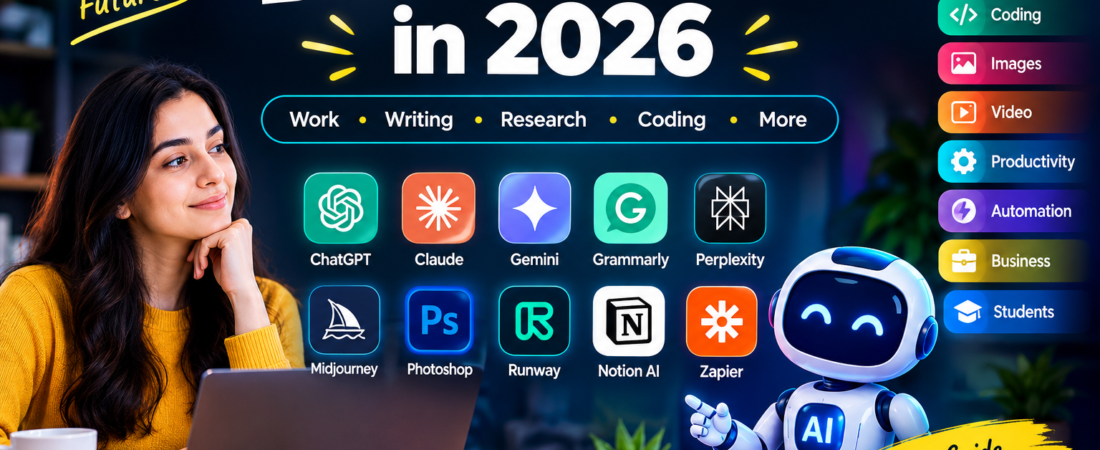
This guide covers some of the best AI tools to consider in 2026, organized by the tasks they are designed to help with. Whether you are a student, freelancer, marketer, business owner, developer, writer, designer, or everyday internet user, there is likely an AI tool that can fit your workflow.
Quick Look at the Best AI Tools
Here are some popular AI tools worth exploring:
- ChatGPT — General-purpose AI assistance
- Claude — Writing, analysis, and long-form work
- Google Gemini — AI assistance and Google ecosystem tasks
- Grammarly — Writing and editing
- Perplexity — AI-powered research
- Cursor — AI-assisted coding
- GitHub Copilot — Programming assistance
- Midjourney — AI image creation
- Adobe Photoshop — AI-powered image editing
- Runway — AI video creation and editing
- Notion AI — Notes and productivity
- Zapier — Workflow automation
- n8n — Advanced automation workflows
- Microsoft Copilot — AI features for work and business
The right option depends on what you actually want to accomplish.
What Are AI Tools?
AI tools are software applications that use artificial intelligence to perform tasks that normally require human input.
Depending on the platform, an AI tool may be able to understand text, generate content, analyze information, create images, write code, summarize documents, produce videos, or automate workflows.
Some tools are designed for one specific task, while others work as general-purpose AI assistants.
For example, a writing tool may focus on grammar and editing, while an AI assistant can help with research, brainstorming, writing, analysis, and coding from the same interface.
Best AI Tools for General Use
1. ChatGPT
ChatGPT is a versatile AI assistant that can be used for a wide variety of everyday and professional tasks.
You can use it for brainstorming ideas, drafting content, summarizing information, creating outlines, explaining difficult concepts, analyzing text, and assisting with coding.
It can be particularly useful when you need one tool that handles multiple types of work.
Best for: General AI assistance, writing, brainstorming, research, coding, and productivity.
2. Claude
Claude is another general-purpose AI assistant that is widely used for writing, analysis, document work, and complex instructions.
It can be useful when working with long pieces of text or when you need help organizing and improving written material.
Best for: Long-form writing, analysis, documents, and professional workflows.
3. Google Gemini
Gemini is Google’s AI assistant and can be useful for people who already rely heavily on Google’s ecosystem.
It can assist with questions, writing, brainstorming, analysis, and other everyday AI tasks.
Best for: General AI assistance and users working within Google’s ecosystem.
Best AI Writing Tools
Writing is one of the most common uses for artificial intelligence.
AI writing platforms can help generate ideas, improve sentence structure, rewrite text, correct grammar, and create first drafts.
Grammarly
Grammarly focuses heavily on writing quality, grammar, spelling, tone, and clarity.
It can be useful for emails, business communication, blog posts, academic writing, and other forms of everyday text.
Best for: Editing, grammar, clarity, and improving written communication.
ChatGPT and Claude
General AI assistants can also be useful for writing because they can help with everything from brainstorming to creating complete drafts.
For example, you can use them to create article outlines, rewrite paragraphs, develop headlines, or adjust the tone of existing content.
Best for: Content creation, brainstorming, rewriting, and long-form drafts.
Best AI Tools for Research
Research can take a significant amount of time, especially when you need to collect information from multiple sources.
AI research tools can help users find information, summarize material, identify important points, and organize research.
Perplexity
Perplexity is designed around AI-powered search and research.
It can be useful when you want to ask a question in natural language and explore an answer with supporting sources.
Best for: Online research, source discovery, and quick information gathering.
ChatGPT and Gemini
General-purpose AI assistants can also support research by helping summarize information, compare ideas, organize notes, and explain complicated topics.
For important research, however, information should still be checked against reliable original sources.
Best AI Tools for Coding
AI has also become an important part of modern software development.
Developers can use coding assistants to generate code, explain existing code, identify errors, and speed up repetitive programming tasks.
Cursor
Cursor is an AI-focused code editor designed to help developers work with code using natural-language instructions.
It can be useful for editing existing projects, understanding codebases, and generating or modifying code.
Best for: AI-assisted software development.
GitHub Copilot
GitHub Copilot provides AI assistance inside development workflows.
It can help developers write code, generate suggestions, and work through programming tasks more efficiently.
Best for: Code completion and development assistance.
Claude Code
Claude can also be used for programming-related tasks, including understanding code, debugging, generating solutions, and working through technical problems.
Best for: Code analysis, technical problem-solving, and development assistance.
Best AI Image Generators
AI image generation has changed how creators approach visual content.
Instead of starting every design from scratch, users can describe an idea and generate visual concepts using an AI image platform.
Midjourney
Midjourney is known for generating highly detailed and creative AI images from text prompts.
It can be useful for concept art, creative projects, visual inspiration, and digital artwork.
Best for: Creative AI image generation.
Adobe Photoshop
Photoshop has incorporated AI-powered features that can assist with image editing and content creation.
For designers who already work with Adobe’s creative tools, AI features can become part of an existing editing workflow.
Best for: Professional image editing and AI-assisted design.
Best AI Video Tools
AI video platforms can help creators produce, edit, and experiment with video content.
Runway
Runway offers AI-powered tools for video creation and editing.
It can be useful for creators who want to experiment with generated video, visual effects, and AI-assisted production.
Best for: AI video creation and creative video workflows.
AI video tools are particularly useful for social media creators, marketers, designers, and people experimenting with new visual formats.
Best AI Tools for Productivity
AI can also improve everyday productivity by helping users organize information and reduce repetitive work.
Notion AI
Notion AI combines AI assistance with the Notion workspace.
It can help users work with notes, documents, ideas, and project information.
Best for: Notes, documentation, planning, and team productivity.
ClickUp
ClickUp combines project management features with AI capabilities designed to support workplace productivity.
It can be useful for teams managing projects, tasks, documentation, and workflows.
Best for: Project management and team productivity.
Best AI Automation Tools
Automation becomes especially useful when you repeatedly perform the same digital task.
Instead of manually moving information between applications, automation tools can connect different services and create workflows.
Zapier
Zapier is widely used for connecting applications and automating repetitive workflows.
For example, businesses can create workflows that move information between apps when a specific event occurs.
Best for: No-code automation and connecting different applications.
n8n
n8n is a workflow automation platform that can be useful for users who want more flexibility and control over their automations.
It can be used to build workflows that connect services, process information, and trigger different actions.
Best for: Flexible and advanced workflow automation.
Best AI Tools for Business
Businesses can use AI for communication, document work, customer support, data analysis, marketing, productivity, and automation.
Microsoft Copilot
Microsoft Copilot provides AI capabilities across Microsoft’s productivity ecosystem.
For organizations already using Microsoft products, AI features can potentially fit into existing work processes.
Best for: Workplace productivity and Microsoft-based business environments.
Businesses should consider factors such as data handling, security, user permissions, integrations, and cost before introducing an AI tool into important workflows.
AI Tools for Students
Students can use AI tools for learning, brainstorming, research, writing assistance, and understanding difficult concepts.
Some useful categories include:
- AI assistants for explanations
- Research tools for finding sources
- Writing tools for editing
- Note-taking and summarization tools
- AI tools for brainstorming
- Coding assistants for programming courses
The best approach is to use AI as a learning aid rather than simply submitting AI-generated work without understanding it.
Always follow your school’s or university’s rules regarding AI use.
Free AI Tools
Many AI platforms offer free access or limited free plans, although the exact features and usage limits can change.
Free AI tools can be useful if you are testing different platforms before paying for a subscription.
When comparing free AI tools, look beyond the word “free.” Check:
- Daily or monthly usage limits
- Available features
- Export options
- Commercial-use restrictions
- File or image limits
- Model availability
- Watermarks
- Integration options
A free plan may be enough for occasional users, while professionals may need paid features.
Best AI Tools Comparison
| AI Tool | Main Use | Suitable For |
| ChatGPT | General AI assistance | Individuals and professionals |
| Claude | Writing and analysis | Writers and knowledge workers |
| Gemini | AI assistance | Google users |
| Grammarly | Writing improvement | Students and professionals |
| Perplexity | Research | Researchers and students |
| Cursor | Coding | Developers |
| GitHub Copilot | Programming | Developers |
| Midjourney | Image generation | Creators and designers |
| Photoshop | Image editing | Designers |
| Runway | Video creation | Video creators |
| Notion AI | Productivity | Individuals and teams |
| Zapier | Automation | Businesses and professionals |
| n8n | Workflow automation | Technical users |
| Microsoft Copilot | Workplace AI | Businesses |
How to Choose the Right AI Tool
There is no single AI platform that is perfect for every user.
Before choosing one, consider what you actually need.
1. Identify Your Main Task
Start with the problem you want to solve.
Do you need help with writing, research, coding, images, video, productivity, or automation?
Choosing by task makes the comparison much easier.
2. Check the Pricing
Look at both free and paid plans.
If you only use AI occasionally, a free plan may be sufficient. Heavy users may need additional features or higher usage limits.
3. Consider Integrations
An AI tool becomes more useful when it works with the applications you already use.
Check whether it integrates with your existing workflow.
4. Think About Privacy
Don’t automatically upload sensitive business, financial, personal, or confidential information to an AI service.
Review the platform’s privacy and data-handling information before using it for sensitive work.
5. Test Before Committing
Whenever possible, try the free version or trial before purchasing.
A tool that looks impressive on paper may not match your actual workflow.
AI Tools in 2026: What Is Changing?
AI tools continue to expand beyond simple chatbots.
Modern platforms increasingly combine multiple capabilities, including:
- Text generation
- Image creation
- Video generation
- Coding assistance
- Research
- Voice interaction
- Document analysis
- Workflow automation
- Business productivity
This means the difference between separate AI categories is becoming less clear.
A single AI assistant may now support several tasks that previously required different applications.
Tips for Getting Better Results From AI
Simply using an AI tool does not guarantee a good result.
Your instructions matter.
Be Specific
Instead of asking for “an article,” explain the topic, audience, format, tone, length, and goal.
Provide Context
Give the AI enough information to understand what you are trying to accomplish.
Review the Output
AI-generated content can contain errors or outdated information.
Always review important information before publishing or using it.
Don’t Rely on One Tool
Different AI platforms have different strengths.
You may find that one tool works better for writing while another is more useful for research, images, coding, or automation.
Are AI Tools Replacing Human Workers?
AI is changing how many tasks are performed, but the impact differs across industries and job roles.
In many workflows, AI is being used to assist people rather than completely replace the entire job.
For example, a writer may use AI for brainstorming, a developer may use an AI coding assistant, and a marketer may use AI for generating initial content ideas.
Human judgment remains important for reviewing information, making decisions, understanding context, and producing final work.
What Are the Risks of Using AI Tools?
AI tools can be useful, but they also have limitations.
Potential issues include:
- Incorrect or outdated information
- Privacy concerns
- Copyright questions
- Over-reliance on generated content
- Biased or incomplete responses
- Security concerns
- Unexpected costs from paid services
For important decisions, verify AI-generated information using trustworthy sources.
Frequently Asked Questions
What are the best AI tools in 2026?
The best AI tool depends on your specific task. Popular options cover general AI assistance, writing, research, coding, image generation, video, productivity, and automation.
Which AI tool is best for writing?
Tools such as ChatGPT, Claude, and Grammarly can help with different parts of the writing process, including drafting, editing, brainstorming, grammar, and rewriting.
What is the best AI tool for research?
Perplexity and general-purpose AI assistants can help with research and information discovery. Important claims should still be checked against original or authoritative sources.
Are there free AI tools?
Yes. Many AI platforms provide free plans or limited free access. Features, limits, and pricing can change over time.
Which AI tools are useful for coding?
Cursor, GitHub Copilot, Claude, and other AI coding assistants can help developers with code generation, debugging, explanation, and development tasks.
Can students use AI tools?
Students can use AI tools for learning, brainstorming, explanations, research assistance, and editing, but they should follow their school’s or university’s AI policies.
How do I choose an AI tool?
Start by identifying your main task, then compare features, pricing, integrations, privacy considerations, and usage limits.
Final Thoughts
The growing number of AI platforms gives users more options than ever.
The best AI tools are not necessarily the tools with the longest feature lists. The right choice depends on your goals, workflow, budget, and the type of work you need to complete.
For general assistance, AI chatbots can cover many everyday tasks. Specialized platforms can be more useful for writing, research, coding, image generation, video, productivity, and automation.
Instead of trying every AI tool available, identify the tasks that take the most time in your workflow and choose tools that can solve those specific problems.